Two price tags on one product. Google can reject it.
Catalog Truth reads your Shopify or WooCommerce product pages and checks the price and stock on up to 250 product pages against your own catalog (the first 20 straight away, the rest with one click), then checks your refund, shipping and contact pages. Free.
Got a misrepresentation warning? Here's what the check covers.
It checks
- Price and stock on up to 250 product pages against your own catalog, per size and color, 20 pages at a time
- The product data Google reads on the page: missing, broken, or a price range instead of one price
- Your refund, shipping, privacy and terms pages: missing or very short, and whether the refund policy states a return window, quoted from your own page
- Whether shoppers can find a contact page, and whether it or your home page shows a way to reach you: email, phone, contact form, social profile or street address, and whether that email is on your store's domain
- Barcodes (GTINs) with the wrong length, a bad check digit, or shared by two variants
- robots.txt rules that keep Google off your product pages
- Images under 500×500, missing weights, duplicate variants, long titles and empty descriptions
It leaves to you
- Your business name, address and phone number, and whether they match Merchant Center
- Checkout, payment and what happens after the order
- Ad text, sale claims and reviews
- Your Merchant Center account settings and feed
- CheckRun it on your store.
- FixEach section of the report says what to change and links Google's own help.
- Ask GoogleOnce the fixes are live, use Request review in Merchant Center if your account shows it.
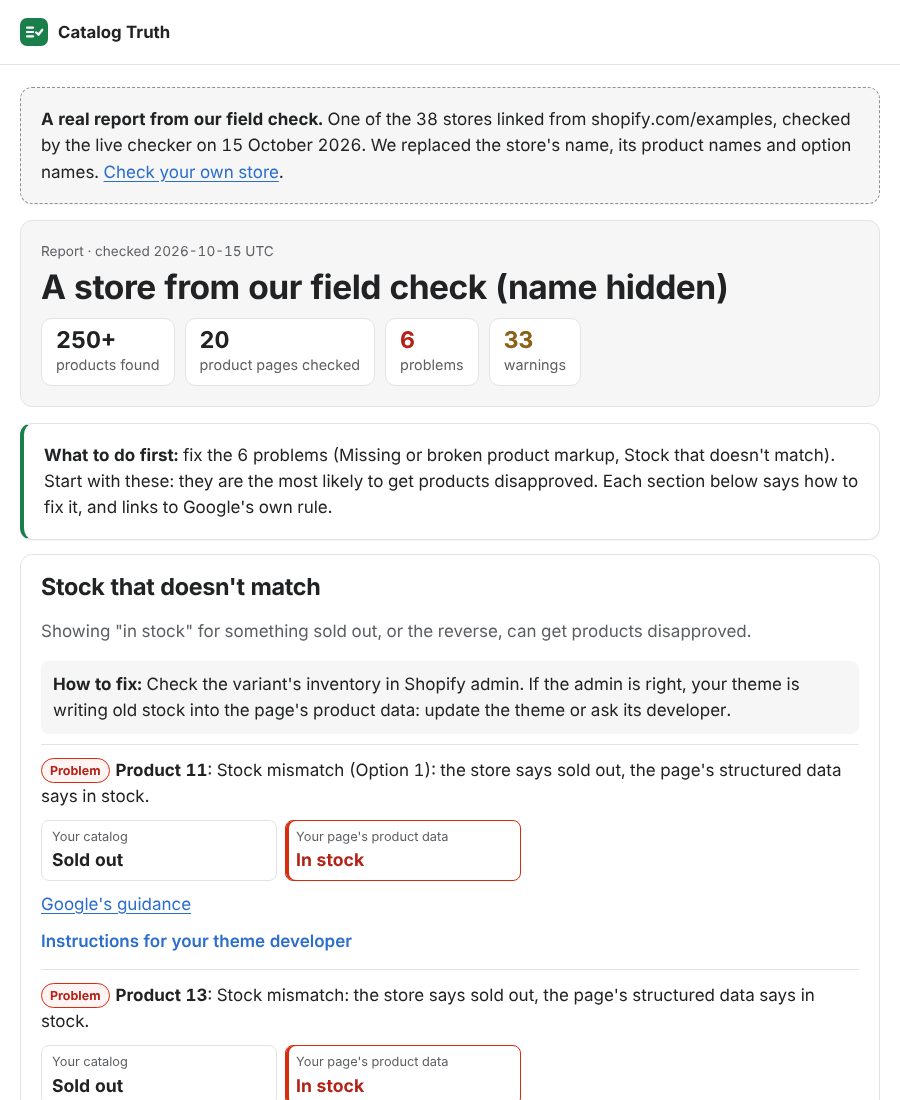
One real finding, X-rayed
From our field check on 15 October 2026. This store's own catalog says the option is sold out. Press X-ray to read what its product page tells search engines.
A real store · one product option · name hidden
We ran it on 38 real stores. 5 had a stock mismatch.
We checked the 38 Shopify stores linked from Shopify's own examples page, 20 product pages each. At 5 stores, a product page told search engines a different stock status from the store's own product data. We re-fetched each flagged page to confirm it.
On 29 Oct 2026 we also ran the live checker on two more real stores. A whole-catalog check of one Shopify store asked for all 250 product pages and read 234; the store asked us to slow down on the other 16. A WooCommerce store got a full report, with its policy pages found from its own links.
How we counted
Source: shopify.com/examples, read 15 Oct 2026. It linked 42 stores, and 38 of them run on Shopify. We read 760 product pages, one request at a time. One store was flagged for a price mismatch, but its product data didn't load when we re-checked, so it isn't counted. Shopify chose these brands to feature, so they're likely better run than most stores. We don't name the stores.
Sold out? The stock desk writes the reorder.
When you check your store, the report ends with a stock desk built from its own product list. It covers up to 250 products. You fill in the quantities and send the note yourself. Catalog Truth never orders anything.
- Finds what's goneEach sold-out size and color, and every product with some of its options sold out.
- Flags the risky ones firstSold out in your catalog, still "in stock" on the page Google reads.
- Drafts the reorderOne note per vendor with product, option and SKU. Quantities are yours to fill in.
- Product, option (SKU): qty ___
Run several stores? Check them all in one list.
Paste up to 5 store addresses. Each gets the full check and its own report.
No fine print
Shelf check
- Up to 250 product pages, 20 at a time
- Price and stock for each size and color
- A report you can save as a PDF
- A weekly re-check link that shows what changed
Made by Bryan at Steel Lantern. A question about your report goes straight to bryan@steellantern.com. Bryan replies within one business day.
What's free
Each check reads 20 product pages straight away, and up to 250 when you ask, and compares the price and stock of each size and color with your catalog, with the fix for each problem and notes for your developer. The stock desk, reorder notes and a weekly re-check link come with it. No sign-up and no card.
Bigger stores
After the first 20 pages, one click checks the rest, 20 at a time, up to the first 250 products your store lists, in one report. Up to 6 checks an hour.
Paid plan
There isn't one. Nothing here costs money today. A plan for bigger stores and automatic re-checks is next, and its price goes on this page before anyone is asked to pay.
What it never does
Log in, change your store, or check it on a timer. Reports are kept 30 minutes. A weekly re-check link keeps the store address, the product names checked and a short list of findings until you delete it, or for 180 days after its last visit. It reads only public pages and follows your robots.txt.
What merchants use today
- Simprosys Google Shopping FeedFeed app
- Multifeed Google Shopping FeedFeed app
- Nabu for Google Shopping FeedFeed app, finds Merchant Center errors
- AdNabu Misrepresentation CheckerSite and policy checks
None of these four lists a check of the price and stock your product page shows against your own catalog. Catalog Truth does that check, and works alongside any of them.
See the sources
| Tool | What its page says it does |
|---|---|
| Simprosys Google Shopping Feed | Product feeds for Google Shopping, Microsoft, Meta and other channels; "Error validation" |
| Multifeed Google Shopping Feed | Product feeds; "See errors right from the Dashboard and fix from inside the app" |
| Nabu for Google Shopping Feed | "It finds Merchant Center errors and disapprovals, suggests fixes and gives every product a feed health score" |
| AdNabu Misrepresentation Checker | Checks including contact info, policies, SSL, page speed and structured data |
How it works
Each check reads the store's public product list (/products.json, up to 250 products) and 20 product pages (up to 250 if you ask), including the product data the theme writes into each page for search engines. It compares price and stock for each size and color. The stock desk comes from the same product list. Every request follows the store's robots.txt.
A page that keeps one price for every size is a known cause of Google price mismatches. ShoppingFeeder's help center describes it as "static variant pricing that doesn't update when customers select different options" (ShoppingFeeder help).